Building a Home Theater Projector Setup You Will Actually Use
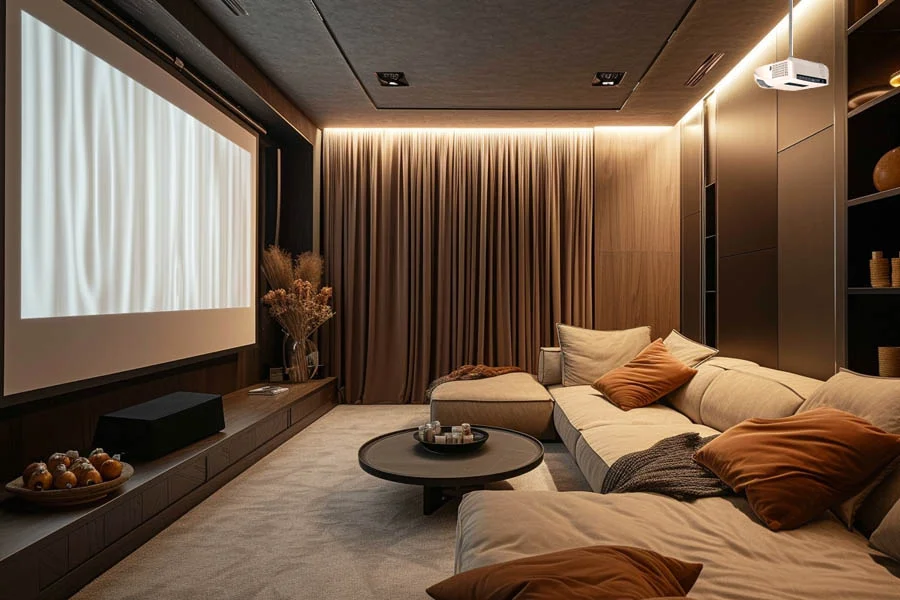
Plenty of people buy a projector, use it twice, and leave it in a closet. The problem is rarely the hardware itself but the setup surrounding it. A home theater projector shines when the room, sound, and seating work together. When those pieces align, watching films becomes an event the whole household anticipates. Weekend movie marathons, playoff games, and video game nights all feel bigger. Planning matters more than spending, since thoughtful choices beat expensive add-ons. This article walks through the decisions that make a setup genuinely usable. You will learn about room planning, audio pairing, screens, seating, and calibration. Each section focuses on practical steps rather than technical jargon. The goal is a theater you actually enjoy every week.
Why a Home Theater Projector Feels Different
Television screens rarely fill your field of vision the way a projected image can. A home theater projector creates images large enough to feel immersive rather than decorative. That scale changes how you experience films, especially sweeping landscapes and action scenes. Reflected light also feels gentler on the eyes during long viewing sessions. Many viewers compare the effect to a cinema rather than a living room. The projector itself takes up little space when the screen is not in use. Walls return to normal decor once the show is over. That flexibility suits multipurpose rooms and smaller homes alike. The experience simply feels more special than switching on a television. That sense of occasion keeps people coming back. A useful companion read is our article on choosing a surface to project onto.
Planning the Room First
Room conditions determine how good any projected image can look. Dark rooms deliver the best contrast and richest colors. Basements, spare bedrooms, and dens often make ideal dedicated spaces. Living rooms can work too with blackout curtains and careful lighting control. Measure walls to determine the largest screen size the room can accommodate. Consider where power outlets, cables, and equipment will sit. Plan speaker placement early, since a home theater sound system needs room to breathe. Think about ventilation, since projectors and electronics generate heat. Acoustics improve with rugs, curtains, and soft furniture that absorb echoes. A planned room prevents costly changes later.
Pairing a Home Theater Projector with Sound
Picture quality grabs attention, but sound creates genuine immersion. Built-in projector speakers rarely match the scale of a large image. Pairing your home theater projector with external audio transforms the experience. Soundbars offer an easy upgrade with minimal wiring. Formats like dolby atmos add height effects for a more three-dimensional soundstage. Dialogue clarity improves noticeably with a dedicated center channel. Subwoofers bring explosions, music, and rumbling engines to life. Connect audio through HDMI ARC or optical outputs where supported. Balance speaker levels so dialogue stays clear without constant volume changes. Great sound turns watching into feeling.
Screens, Seating, and Sight Lines
Screens improve brightness, contrast, and color compared with bare walls. Matte white screens suit dark rooms, while gray screens help in brighter spaces. Seating distance should feel comfortable, often around one to one and a half times the screen width. Raised rear seating helps larger groups see without obstruction. Recliners and sofas should face the screen directly rather than at sharp angles. An av receiver can route sources and audio neatly from a single hub. Keep walkways clear so people can move without crossing the beam. Dim, indirect lighting behind seating adds comfort during intermissions. Test sight lines from every seat before finalizing furniture positions. Thoughtful arrangement makes every seat a good seat.
Calibrating Your Home Theater Projector
Factory settings rarely suit every room perfectly. Start by selecting a cinema or movie picture mode for accurate color. Adjust brightness so dark scenes show detail without looking gray. Set contrast so bright highlights stay vivid without losing texture. Your home theater projector may also offer color temperature settings worth exploring. Warmer settings generally look more natural for films. Calibration discs or streaming test patterns provide helpful reference images. Position your home theater speakers carefully and run any audio calibration tools available. Save separate presets for films, sports, and gaming if possible. Small adjustments often deliver surprisingly large improvements.
Choosing a Home Theater Projector That Fits
The right projector matches your room, screen size, and viewing habits. Majesticor offers an Ultra HD 4K beam projector built for home theater entertainment. It delivers high-resolution images designed to fill large screens with detail. Review the product page for brightness, inputs, and throw distance before ordering. Compare those specifications with your room measurements and seating plan. Budget for a screen, cables, and audio upgrades alongside the projector itself. Choosing a home theater projector that fits these plans ensures you will use it often. Weekly movie nights quickly become a household tradition. Friends and family will look forward to every invitation. A well-planned theater rewards you every time the lights go down. Our piece on what ultra-sharp resolution really delivers picks up where this section leaves off.









Leave a comment
You must be logged in to post a comment.