Swapping the Television for Light: A Living Room Projector in Daily Life
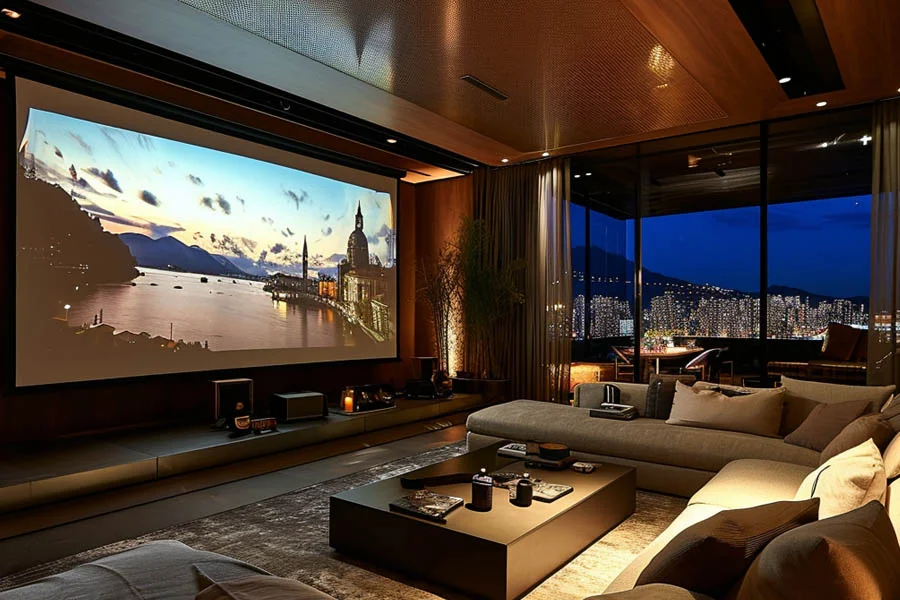
Televisions have grown steadily larger, yet they still struggle to match the scale of a projected image. Once a screen reaches 85 inches, prices climb steeply and wall space disappears. A living room projector offers another path, delivering enormous images from a compact box on a shelf. When not in use, the wall returns to being a wall, with no black rectangle dominating the room. That flexibility appeals to people who value both big entertainment and calm interior design. Projectors do require more thought about light, placement, and sound than plug-and-play televisions. This article compares the two honestly, covering size, comfort, cost, and everyday convenience. It references a full HD beam projector with 4K support, 1450 ANSI lumens, and built-in streaming. Owner reviews show how it performs in real family rooms. Let us weigh the options side by side.
Living Room Projector or Big Screen TV?
Size remains the most obvious difference between the two technologies. A typical big screen TV tops out around 85 inches before prices become extreme. Projectors easily reach 100 inches or more, with this model capable of up to 300 inches. Televisions win in bright rooms, since their panels stay vivid even with sunlight pouring in. Projectors shine in dim settings, creating a cinematic atmosphere that panels cannot replicate. Native resolution also differs, as this projector displays 1080p while accepting 4K signals. Many viewers find the larger image more immersive than extra pixels on a smaller panel. Portability adds another advantage, letting you move the projector between rooms or outdoors. Each technology suits different priorities and lifestyles. Knowing yours guides the decision.
Finding the Right Viewing Distance
Comfortable viewing depends on matching screen size to seating position. A common guideline places seats about one and a half times the screen width away. Correct viewing distance keeps the whole picture in view without excessive head movement. For a 100-inch image, that usually means sitting roughly ten to twelve feet back. Projectors make adjustment easy, since moving the unit changes image size instantly. Seating height matters too, and lower sofas pair well with screens positioned slightly lower on the wall. Some homeowners choose a sofa with a lower silhouette to keep sightlines open across the room. Test different sizes before committing to a permanent screen location. Comfort should guide the final decision more than maximum size. The best distance feels effortless.
Comfort and the Living Room Projector
Many viewers report that projected images feel gentler on the eyes than bright panels. Light reflects off a screen rather than shining directly toward you, softening its intensity. People prone to eye strain during long viewing sessions often appreciate that difference. Larger images also let you sit farther back while seeing the same level of detail. Even so, comfortable habits matter regardless of display type. Take breaks during marathon sessions and keep some soft ambient light on behind seating. Adjust brightness settings for evening viewing rather than running maximum output in a dark room. Families appreciate that children watch from comfortable distances rather than crowding a small screen. Several owners said their kids became enthusiastic about movie nights once the projector arrived. Comfort keeps everyone watching happily.
Costs and Value Compared
Price per inch strongly favors projectors once screens exceed 75 inches. A capable projector often costs far less than a television of comparable size. Building a budget home theater becomes realistic when the display itself stays affordable. Factor in a screen, though the listing mentions an 84-inch screen included as a gift. Built-in 10W speakers with Dolby Audio support reduce initial audio spending. A 50,000-hour light source eliminates the lamp replacements older projectors required. Televisions typically need no extra screen, which narrows the gap at smaller sizes. Streaming sticks may still be necessary for some services, depending on app availability. Overall, large screen sizes deliver the strongest value with projection. Smart budgeting stretches every dollar.
Managing Light Around a Living Room Projector
Ambient light presents the biggest challenge for any projected image. Sunlight washes out contrast, while lamps near the screen reduce color depth. A living room projector performs best when windows have curtains or blinds that close easily. This model’s 1450 ANSI lumens handle moderate ambient light reasonably well, according to reviewers. Several owners praised visibility during daytime, though darker conditions still look best. Position lamps behind or beside seating rather than near the screen. Choose matte wall finishes that avoid glare and hot spots. Evening viewing naturally offers the most cinematic picture quality. Smart light control turns any room into a convincing theater. Small adjustments deliver big improvements.
Making a Living Room Projector Work Daily
Everyday convenience determines whether a projector replaces or complements your television. Built-in Android 9.0 and WiFi 6 allow streaming directly from the projector itself. A streaming stick connected via HDMI covers any apps not available on the built-in system. Digital 6D keystone correction simplifies setup when the projector sits on a side table. Quick startup and easy remote control make casual evening viewing practical. This model holds a perfect 5.0 rating across 52 reviews, praised for picture quality and simple setup. It comes in white, black, and gray to blend with different decor. Select the US plug at checkout to ensure compatibility. To compare specifications and colors, see the projector up close before deciding. Your wall might become the best screen in the house.